Pokepix Color By Number
- 4.6
- Rating
- 1.00M
- Installs
- Free
- Price
 Analysis by App-foxy
I find Pokepix Color By Number most useful when I want a quiet, low-pressure activity rather than a serious drawing tool. It turns picture coloring into a simple tap-by-tap routine, making it easy to settle into for a few minutes while waiting, commuting, or winding down at home. The appeal is not creative freedom; it is the gentle satisfaction of completing an image without having to decide what to draw or which colors to mix.
That distinction matters. This is an Art & Design app, but I would not compare it directly with a sketching studio, a painting app, or a professional illustration workspace. Its purpose is much narrower and more relaxing. I see it as a digital coloring book built around numbered areas, with the familiar Pokémon-inspired theme giving the experience a clear identity. If you enjoy recognizable characters and repetitive, simple tasks, it has a pleasant rhythm. If you want to make original artwork, it will feel restrictive.
Why the coloring loop works so well
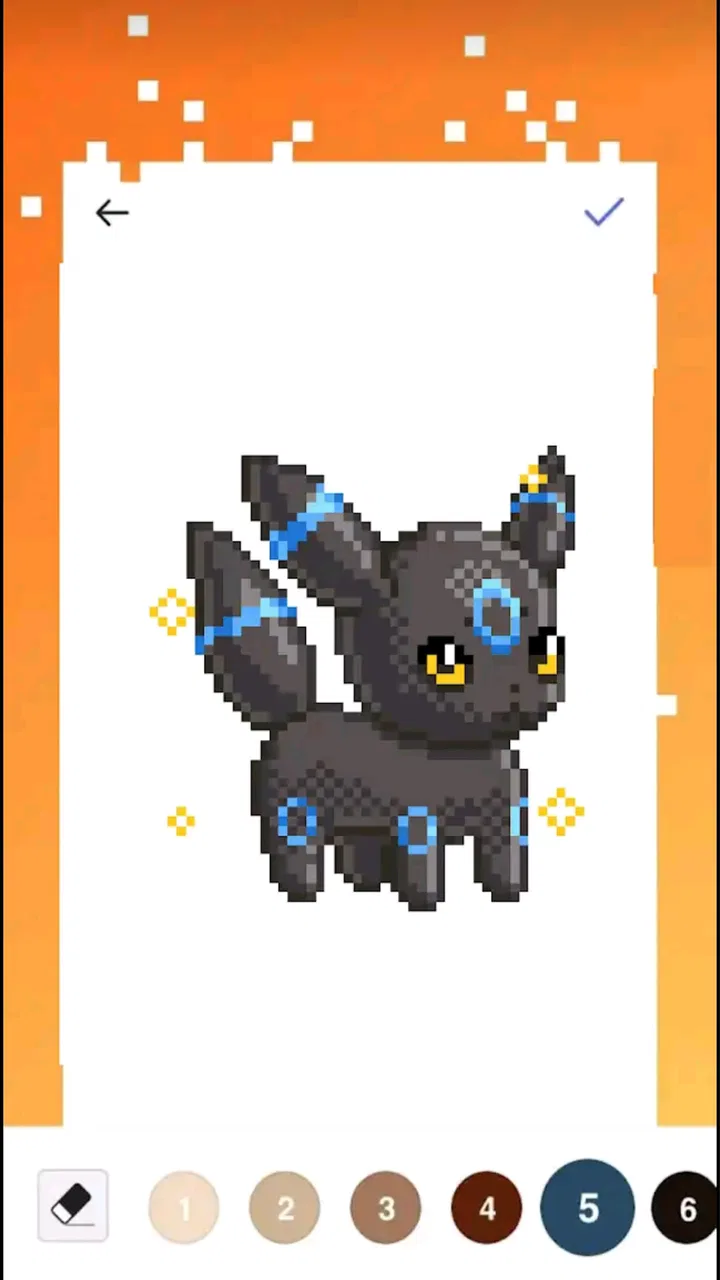
The basic interaction is immediately understandable: choose a color or numbered option, locate the matching areas, and fill them by tapping. That simplicity is the strongest part of the experience. I never need to learn a complicated interface before beginning, and the task remains approachable even when I am tired or distracted. The small decisions involved in finding the right spaces provide just enough concentration to keep my attention without turning the activity into work.
You May Also Like

 Blood Strike: 2.5 Anniversary
Blood Strike’s Loadouts Turn Every Drop Into a Tactical Gamble
A close look at Blood Strike’s custom loadouts: how fast access to signature weapons reshapes its battle royale rhythm, rewards preparation, and narrows the gap between fights.

 Pandora - Music & Podcasts
Pandora’s Music Is Easy to Start, but Harder to Recover
Pandora’s strength is its low-effort path from a seed to a station. Its weak spot is how much confidence it asks you to place in connection, setup, and quiet recovery.

 8 Ball Pool
 Is Built on Rivalries, Rematches, and Routine
A close look at the rivalries, rematches, shared routines, and unanswered safety questions that turn a quick pool match into a persistent mobile community.

 Samsung Music
’s Quiet Strength Is Playing What You Already Own
Its reach comes less from spectacle than from dependable access to a personal library. That simplicity is both the app’s strongest retention engine and its ceiling.

 AccuWeather: Weather Radar
AccuWeather Review: A Quick, Clear Forecast for Everyday Decisions
For everyday plans, the best forecast is the one you can understand quickly. AccuWeather makes rain timing, radar, and local conditions easy to act on, with a few trade-offs.

 Hill Climb Racing
Why Hill Climb Racing Still Turns Crashes Into One More Run
A tiny car, a bumpy hill and one more upgrade: Hill Climb Racing keeps resurfacing because its simple chaos makes every near-miss feel personal.
More From Our News Desk



The numbered format also gives each picture a built-in sense of progress. Instead of facing a blank canvas, I can see that the image is already divided into manageable pieces. That removes the hesitation many people feel when opening a conventional art app. There is no pressure to be imaginative, technically skilled, or original. I only need to continue with the next section, which makes the app particularly comfortable for short sessions.
In my experience, the best use is a ten-minute break when I want something more engaging than scrolling but less demanding than a game with rules, timing, or competition. I might open it after dinner, complete part of a picture, and stop without feeling that I have abandoned an unfinished project. The activity is naturally modular, so it suits people whose free time arrives in small pieces.
The app’s focus on relaxation is convincing because the coloring process has a predictable pace. Once I understand the current image, my attention moves between the palette and the picture in a steady pattern. That can be useful after a busy day, especially for anyone who finds silent meditation difficult. It does not require me to empty my mind; it gives my mind one small, repetitive job instead.
There is also a useful difference between coloring by number and ordinary digital coloring. In a freehand app, the result depends heavily on hand control, brush settings, layers, and color choices. Here, the structure does much of the work. I can concentrate on recognition and completion rather than technique. For a beginner who wants an art-related activity without feeling like a beginner artist, that is a meaningful advantage.
A practical way to use it during a busy day
A realistic routine would be to keep one image available for short sessions rather than trying to finish everything at once. During a lunch break, I can complete a few obvious sections first, then leave the more detailed areas for a quieter moment. This prevents the activity from becoming a race to completion and makes the app feel more like a reset button than another item on a task list.
I also recommend resisting the urge to tap randomly just to move faster. The satisfaction comes from noticing which spaces belong to the selected number and gradually watching the picture become clearer. When an image has many small areas, slowing down improves the experience. It turns what could be a repetitive tapping exercise into a modest visual search activity.
Another useful habit is to treat completed pictures as endpoints rather than as a reason to keep playing indefinitely. The app is easy to open repeatedly because there is little friction, but its calming quality can disappear if I use it automatically for a long stretch. Short, intentional sessions work better for the purpose the app is aiming at.
What makes it approachable for families and casual users
The Everyone content rating makes the app broadly accessible, and the controls are simple enough for casual users who do not normally spend time with art software. A child can understand the central idea quickly, while an adult can use the same process as a quiet distraction. The theme gives the pictures more personality than a completely generic coloring collection would have, particularly for users already familiar with Pokémon-style characters.
That said, I would still consider the user’s expectations before handing it to a child. The coloring itself is straightforward, but the presence of optional purchases means I would pay attention to how the device is configured for spending. The app is free to start, yet the free entry point should not be confused with an entirely purchase-free experience. For family use, that practical detail matters more than the attractive theme.
On compatible devices, the minimum operating system is Android 5.0, which keeps the technical entry requirement relatively modest. The current version is 1.9.2. Those details are useful when deciding whether an older phone or tablet is suitable, although actual comfort will still depend on screen size, responsiveness, and how easy it is to tap small sections accurately.
The most important limitation: this is not real drawing
The central weakness is also the app’s defining design choice. I am following a prepared image rather than creating one. The numbered structure prevents mistakes and makes the activity relaxing, but it also limits personal expression. I cannot freely change the composition, invent a background, or develop a character in my own style. Anyone looking for a genuine creative outlet may quickly feel that the app is doing too much of the artistic work for them.
This limitation becomes clearer when compared with usual alternatives in the Art & Design category. A sketching app offers a blank page, adjustable brushes, and room to practice. A painting app gives more control over color, texture, and layers. Even a traditional coloring app with open palettes can provide more ownership over the final image. Pokepix Color By Number is easier to begin than those alternatives, but that convenience comes from giving up control.
There is a second trade-off in the numbered workflow. The first part of a picture can feel rewarding because the image gradually takes shape, while later sections may become a search for tiny matching spaces. On a small phone screen, that can be tiring, particularly for users with less precise touch control. A larger tablet may make detailed pictures more comfortable, but the app’s core method remains the same: locate, tap, repeat.
I also would not choose it for someone who wants a strong sense of challenge. There is concentration involved, but the experience is intentionally gentle. It does not replace a puzzle game for users who want strategy, escalating difficulty, or a competitive goal. Its success depends on whether you value calm repetition more than novelty or mastery.
Free access and the purchase decision
The app is free, which makes it easy to try without committing money at the start. Optional in-app purchases range from $1.99 to $99.99 per item, so the possible spending range is wide. I would approach that carefully. The free download is attractive for testing whether the coloring loop suits me, but anyone who dislikes locked content or feels tempted by large bundles should decide on a personal spending limit before exploring further.
For me, the sensible approach is to use the free portion as a trial of the actual routine, not simply as a preview of the artwork. Ask whether the tapping feels relaxing after several sessions, whether the theme holds your interest, and whether the image detail is comfortable on your device. If the answer is no, paying for more content will not solve the underlying mismatch. If the answer is yes, a small purchase may be easier to justify than buying immediately at the highest level.
This is also where the app differs from a physical coloring book. A paper book has a one-time material purchase and requires pencils or markers, while this app removes that setup and lets me color without carrying supplies. On the other hand, physical coloring offers a more tactile experience and does not depend on a phone screen. The better choice depends on whether convenience or hands-on texture matters more to me.
Who should make room for it
I would recommend it to Pokémon fans who enjoy calm, guided activities, casual users who want a simple way to pass a few spare minutes, and beginners who feel intimidated by open-ended drawing software. It is also a reasonable option for someone experimenting with digital coloring for the first time. The low learning curve means I can understand the main interaction almost immediately, and the finished picture provides a clear stopping point.
It may work especially well for people who use their phone as a way to transition between activities. A short coloring session can fill the gap before an appointment or help create distance from social feeds. The important point is to use it deliberately. It is most effective when I choose it because I want a quiet visual task, not when I am simply searching for anything to tap.
I would suggest skipping it if your main goal is to learn illustration, practice brush control, design original characters, or produce artwork for sharing as a personal creation. In those cases, a freehand drawing app or a more complete painting program is the better investment of time. I would also look elsewhere if you need deep customization, advanced editing, or a demanding game-like progression system.
Parents and gift-givers should think about the purchase model as well as the age rating. The Everyone label makes the content broadly suitable, but free installation and optional spending are separate questions. On a shared device, checking purchase controls is a sensible step before letting a child explore independently.
How it compares with ordinary alternatives
Against a conventional coloring book, the app wins on portability and convenience. I do not need a pencil case, an eraser, or a clear table. The numbered guidance also reduces the chance of coloring outside the intended scheme. But the screen lacks the physical feel of paper, and the act of tapping is less expressive than choosing a pencil pressure or blending two shades by hand.
Against a freehand drawing app, it wins on confidence. I can produce a finished-looking image without understanding layers, brushes, or perspective. The trade-off is that I learn little about drawing while using it. It is an activity built for completion and relaxation, not a lesson disguised as entertainment.
Against a general puzzle or casual game, it offers a quieter type of attention. There is no need to react quickly or plan several moves ahead. That makes it suitable when I want mental occupation without stimulation. However, users who need variety, surprise, or a stronger sense of achievement may find the repeated coloring pattern too narrow over time.
The developer, August Martin, has positioned the experience around accessible digital coloring rather than a broad creative suite. That focused identity is a strength when the goal is clear. I know what kind of session I am opening, and I am not distracted by tools that I will never use. It is a weakness only if I expect the category label to promise more artistic freedom than the app actually provides.
What the popularity suggests, and what it does not
The app has passed one million installs, and its average rating is 4.6 from around 132 thousand ratings, with roughly 23 thousand written reviews. Those figures suggest that the central idea has found a sizable audience, but popularity does not remove the need to test the interaction personally. A highly rated coloring app can still be wrong for someone who wants open-ended creation or dislikes repetitive touch gestures.
I read that response as evidence that the app succeeds at a specific promise: making digital coloring easy to start and emotionally undemanding. I would not interpret it as proof that it offers the depth of a professional art tool. The distinction helps set realistic expectations before downloading it.
My verdict after weighing the trade-offs
Pokepix Color By Number is a focused relaxation app with a recognizable theme and an unusually low barrier to entry. Its best quality is the way it removes creative pressure: I can sit down, follow the numbered areas, and enjoy visible progress without needing artistic confidence. For short breaks and gentle evening use, that is enough to make it worthwhile.
Its limitations are equally clear. The experience offers little room for personal expression, detailed work can become awkward on a small screen, and optional purchases deserve attention because individual items can cost from $1.99 up to $99.99. I would not recommend buying anything until the free experience has shown that the repetitive process genuinely helps you relax.
Overall, I would recommend it to casual colorers, fans of the theme, and anyone seeking a guided alternative to scrolling. I would steer aspiring artists toward a drawing or painting app instead. The right reason to install it is not to become a better illustrator, but to enjoy a simple, structured pause. For that purpose, it delivers a pleasant experience, provided I accept its narrow focus and use it as a calming pastime rather than expecting a full art studio.
FAQs for Pokepix Color By Number
01What is Pokepix Color By Number?
Pokepix Color By Number is a mobile app designed for both Android and iOS platforms that offers a relaxing coloring experience. It blends the fun of pixel art with a color-by-number system, allowing users to fill in intricate designs and images of various Pokémon characters. It's perfect for fans looking to unwind with a creative outlet.
02Is Pokepix Color By Number free to use?
Pokepix Color By Number offers a free version with a variety of images to color. However, it may contain ads and in-app purchases for additional features, such as premium images, ad-free experiences, or tools to enhance coloring. Check the app store listing for detailed pricing information and available subscriptions.
03What devices are compatible with Pokepix Color By Number?
Pokepix Color By Number is compatible with most modern smartphones and tablets that run on Android and iOS systems. Ensure your device is updated to the latest operating system version for optimal performance. Always check the app's requirements on the download page to verify compatibility before installation.
04How does the coloring process work in Pokepix Color By Number?
The app provides a grid of pixels, each marked with a number corresponding to a specific color. Users simply select a color and tap the matching numbered pixel to apply it. This intuitive approach makes it easy for all ages to create detailed and vibrant artworks without previous experience in digital coloring.
05Can I save and share my completed artworks in Pokepix Color By Number?
Yes, Pokepix Color By Number allows users to save their completed artworks to their device gallery. Additionally, the app offers sharing features that let you post your creations directly to social media platforms or send them to friends and family, showcasing your progress and artistic accomplishments.
Pros
- Engaging art style keeps users entertained.
- Wide range of categories to color.
- User-friendly interface for easy navigation.
- Regular updates with new pictures.
- Offline mode available for uninterrupted play.
Cons
- Limited free content; many features require purchase.
- Ads can be intrusive during gameplay.
- Some images may be complex for beginners.
- No option to upload custom images.
- Occasional lag on older devices.

Pokepix Color By Number
Gallery